
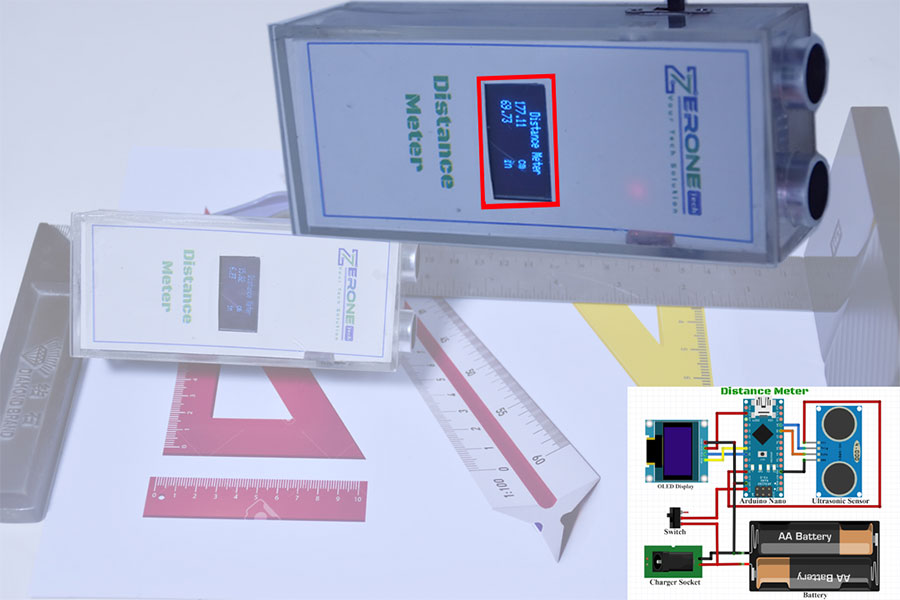

Distance Meter.
Project Fee:Negotiable
Project Discount:0
Project Duration:7 Days
[ Distance Meter ]
This is a very simple and workable project. To measure the distance of an object, we can measure it with this distance meter. An interesting and workable project that you can create very easily by following the rules given by us.

Circuit Diagram:

Advantages:
- The distance can be easily measured.
- Small in size so easy to carry.
- Rechargeable System.
Applications:
It can be used very well to measure the length of an object.
Required Instrument:
- Arduino Nano.
- Ultrasonic Sensor.
- OLED Display.
- Battery.
- Charger Socket.
- Switch.
Summary:
This project is truly interesting and workable. By following the rules given to us, it will work for 100%. You can make it for your own use as it has very high accuracy.
N.B: If you have any problems
working, please contact us and we will assist you.in-shaa-allah.
Code:
//*****************************ZerOne BD*************************
//*********************ZerOne Project Solutions******************
//*********************ZerOne Tech******************
//            Code Developed By...
//            Engr.Md.Nazmuzzaman Jomadder
//            ZerOne BD
//            Contact:01676998099
//            E-mail:sumonj.eee@gmail.com
//            Office:
//            ZerOne BD
//            Plot#03(1st Floor),Road#04,Sec#6/ka.
//            Mirpur, Dhaka-1216
//            Contact:01676998099
//            E-mail: projects.zeronebd@gmail.com
//            Web:www.zeronebd.com
//            www.zeronetechbd.com
//.................................................................
#include
#include
#include
#include
#define trigPin 9
#define echoPin 8
#define OLED_RESET 4
Adafruit_SSD1306 display(OLED_RESET);
void setup() {
Serial.begin (9600);
pinMode(trigPin, OUTPUT);
pinMode(echoPin, INPUT);
display.begin(SSD1306_SWITCHCAPVCC, 0x3C); //initialize with the I2C addr 0x3C (128x64)
display.clearDisplay();
}
void loop() {
float duration;
float distance_cm;
float distance_in;
digitalWrite(trigPin, LOW); //PULSE ___|---|___
delayMicroseconds(2);
digitalWrite(trigPin, HIGH);
delayMicroseconds(10);
digitalWrite(trigPin, LOW);
duration = pulseIn(echoPin, HIGH);
distance_cm = (duration/2) / 29.1;
distance_in = (duration/2) / 73.914;
display.setCursor(25,0); //oled display
display.setTextSize(1);
display.setTextColor(WHITE);
display.println("Distance Meter");
display.setCursor(10,10); //oled display
display.setTextSize(1.8);
display.setTextColor(WHITE);
display.println(distance_cm);
display.setCursor(90,10);
display.setTextSize(1.8);
display.println("cm");
display.setCursor(10,20); //oled display
display.setTextSize(1.8);
display.setTextColor(WHITE);
display.println(distance_in);
display.setCursor(90,20);
display.setTextSize(1.8);
display.println("in");
display.display();
delay(500);
display.clearDisplay();
Serial.println(distance_cm);
Serial.println(distance_in);
} 
Copyright ©2023 ZerOne IT Limited. All Rights Reserved.